


Download A9CAD – Free 2D CAD Software for Windows
Overview of A9CAD
A9CAD is a lightweight, general‑purpose CAD program that focuses on 2D design while keeping the user interface intuitive for both beginners and seasoned designers. First introduced to the public in 2005, the application has amassed over 171,000 downloads and continues to receive steady interest, with more than 80 fresh installations reported each week. Despite its age, A9CAD remains relevant because it delivers the core drafting tools that many modern, heavyweight CAD suites reserve for premium licenses. The software is completely free, runs on legacy Windows platforms (including Windows 98 and earlier), and is offered in English. Its current stable release, version 2.2.1, was last updated on December 13 2005, meaning the installer is compact, occupies far less disk space than most contemporary design tools, and can be deployed quickly on older machines that still serve engineering departments, educational labs, or hobbyist workshops.
What sets A9CAD apart is its focus on simplicity without sacrificing essential features. Users can create precise line work, construct basic shapes, annotate drawings, and export to widely accepted formats such as DXF and SVG. The program is especially popular in regions with strong technical education networks, including Romania, Japan, and Italy, where it is frequently adopted as a teaching aid for introductory drafting courses. Because the tool does not rely on cloud services or subscription checks, it remains a secure choice for organizations that prioritize offline workflows and data sovereignty. In short, A9CAD offers a free, secure, and easy‑to‑learn CAD environment that works on even the most modest Windows PCs.
Key Features that Make A9CAD Competitive
- 2D Drafting Engine: Robust vector‑based drawing engine that supports unlimited layers, snapping, and orthogonal constraints.
- File Compatibility: Native support for DXF (AutoCAD) and SVG export, allowing seamless hand‑off to other CAD or graphic design tools.
- Lightweight Installation: The installer occupies less than 15 MB, making it ideal for legacy hardware with limited storage.
- Customizable Toolbar: Users can add, remove, or rearrange drawing commands to match personal workflow preferences.
- Precision Measurement Tools: Integrated dimensioning, radius, and angle measurement utilities with real‑time updates.
- Print and Plot Support: Direct printing to Windows printers and plotters, with options for scaling, page setup, and line weight control.
- Multi‑Language Ready: Although the current build is English‑only, the codebase is structured for easy localization.
- Offline Operation: No internet connection required after installation, ensuring data stays on the local machine.
Beyond the list, A9CAD’s design philosophy emphasizes stability over flashy features. The drawing canvas remains responsive even when handling large numbers of entities, thanks to an efficient memory management routine written in native C++. While it does not provide advanced 3D modeling, the program includes a simple “extrude to 3‑D” preview that can help users visualize basic depth without leaving the 2D environment. For educators, the lack of licensing constraints means entire classrooms can install the software on aging PCs without worrying about cost or license keys.
Another noteworthy aspect is the built‑in macro recorder. Power users can automate repetitive tasks—such as batch renaming layers or applying a series of line‑type changes—by recording a sequence of actions and replaying it across multiple drawings. This feature, rarely found in free CAD tools, adds a layer of productivity that can close the gap with commercial alternatives for small‑scale projects.
Installation, Usage Instructions, and Compatibility
Step‑by‑Step Installation Guide
Getting A9CAD up and running is intentionally straightforward. Follow these steps to install the program on any Windows computer that meets the minimal requirements:
- Download the installer from the official distribution page. The file is named
A9CAD_2.2.1_Setup.exeand is typically under 15 MB. - Locate the downloaded file, right‑click, and choose “Run as administrator” to ensure the installer can write to the
Program Filesdirectory. - Accept the license agreement, then select the destination folder (the default path works for most users).
- Choose optional components: you may install the optional “Macro Recorder” and “Toolbar Customizer” modules if you anticipate heavy usage.
- Click “Install.” The progress bar will complete within a minute on legacy hardware.
- Once installation finishes, you can launch A9CAD from the desktop shortcut or via the Start menu.
First‑Run Configuration
When you open A9CAD for the first time, a welcome wizard helps you configure basic preferences:
- Units: Choose between millimeters, centimeters, inches, or custom units.
- Default Template: Select a blank drawing or a pre‑defined template that includes standard layers for architecture, mechanical, or electrical drafting.
- Snap Settings: Enable grid snap, object snap, and orthogonal mode according to your workflow.
- Interface Theme: Light or dark theme; the dark theme reduces eye strain during long sessions.
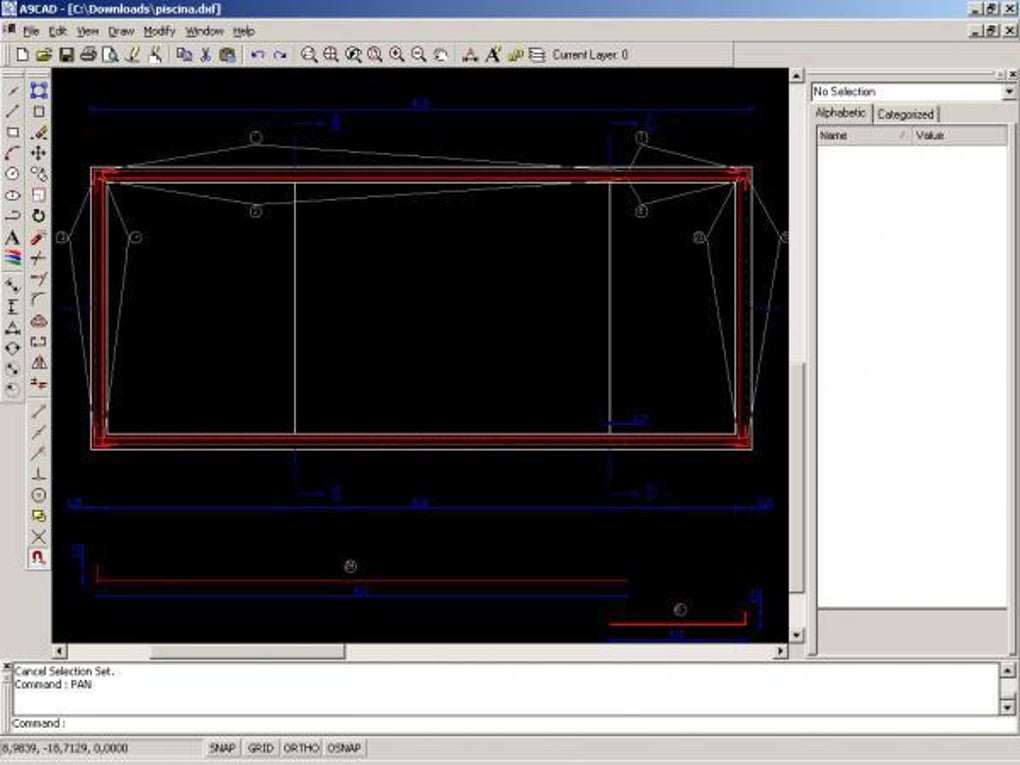
After confirming your choices, the main workspace appears. The toolbar at the top contains the most common commands—line, polyline, rectangle, circle, trim, offset, and dimension. The left‑hand panel lists layers, while the right‑hand side displays properties for the selected entity. Navigation is handled via the mouse wheel for zoom and middle‑button drag for pan, mirroring the experience of more modern CAD suites.
Operating System Compatibility
A9CAD is built for Windows 98 and all later versions, up to Windows 10. Because the executable is a 32‑bit application, it runs smoothly on both 32‑bit and 64‑bit systems without the need for compatibility layers. Users of older Windows editions (such as Windows ME or Windows 2000) can also install the program, provided they have the necessary Visual C++ runtime libraries, which are bundled with the installer.
The program does not require a dedicated graphics card; integrated graphics found in most legacy laptops are sufficient. However, for large drawings with thousands of entities, a modest amount of RAM (at least 256 MB) helps maintain responsiveness. Since A9CAD does not rely on external services, firewall or antivirus settings rarely interfere with its operation.
Pros, Cons, Frequently Asked Questions, and Final Thoughts
Pros and Cons
- Pros:
- Completely free with no hidden licensing fees.
- Extremely lightweight; ideal for older or low‑spec PCs.
- Supports essential CAD formats (DXF, SVG) for easy data exchange.
- Offline‑first design ensures privacy and data security.
- Macro recorder boosts productivity for repetitive tasks.
- Cons:
- Lacks advanced 3D modeling and rendering capabilities.
- No native support for newer Windows versions beyond basic compatibility.
- Interface feels dated compared to modern CAD packages.
- Limited documentation; community forums are the primary support channel.
FAQ – Answers to Common Queries
Is A9CAD really free, or are there hidden costs?
A9CAD is 100 % free. The installer does not ask for a serial number or subscription, and there are no in‑app purchases. All features, including the macro recorder, are available without extra fees.
Can I import a DWG file directly into A9CAD?
A9CAD does not natively read DWG files. However, you can convert DWG to DXF using a free converter (such as Autodesk’s online tool) and then open the DXF in A9CAD.
Will A9CAD run on Windows 11?
Yes. Although A9CAD was last updated in 2005, its 32‑bit architecture allows it to run under Windows 11’s compatibility mode. Users may need to run the program as an administrator for full functionality.
Is there any support for Linux or macOS?
Officially, A9CAD is Windows‑only. Some users have reported success running it through Wine on Linux, but there is no guaranteed support or official documentation for non‑Windows platforms.
How can I export my drawing for CNC machining?
Export your drawing as a DXF file, which is widely accepted by most CNC CAM software. A9CAD’s DXF export preserves layers and line types, facilitating a smooth transition to machining pipelines.
Final Verdict and Call to Action
Overall, A9CAD delivers a surprisingly capable 2D drafting experience given its age and zero‑cost model. If you are a student, hobbyist, or small‑business owner who needs a reliable tool for quick sketches, schematics, or technical drawings, A9CAD is an excellent choice. Its small footprint means you can install it on older laptops that cannot handle modern, resource‑hungry CAD suites. While power users looking for advanced 3D modeling or integrated BIM workflows will need to consider premium alternatives, the free nature and offline‑first design of A9CAD make it a solid addition to any Windows‑based design toolbox.
Ready to give A9CAD a try? Download the latest version now and start creating precise 2D drawings without spending a dime. Experience the simplicity, security, and speed that have kept this program popular for two decades.







